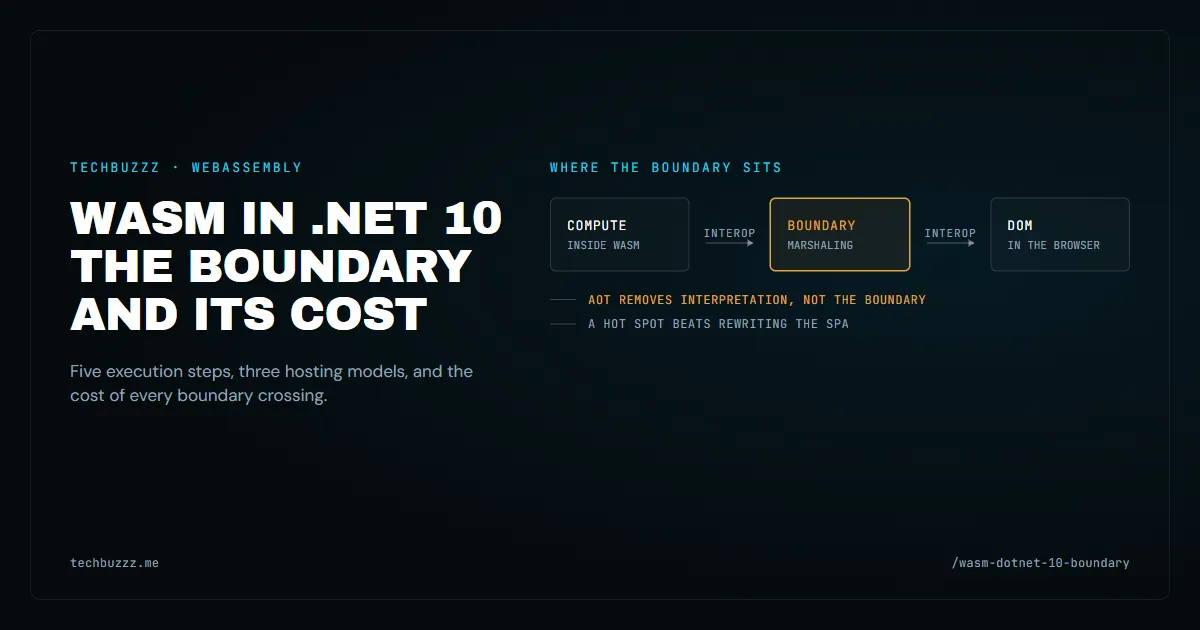
WASM in .NET 10 is not "rewrite your frontend in C#". It is a way to work out where the boundary between .NET and the browser sits — and to pay only for the crossings of that boundary.
This post analyses the architectural map published in Joydip Kanjilal's "Building Cross-Platform High-Performance Apps Using WASM and .NET" (CODE Magazine, issue 5, 2026, pp. 44–63) [1]. The source is valuable as a map: the five execution steps of WebAssembly (WASM), the components of the architecture, three hosting models, and the interop boundary. The demo application the article walks through is somebody else's project walkthrough, and none of it is carried over here. The numbers in the source were re-checked against Microsoft Learn documentation and independent measurements: some of them did not hold up, and that is stated plainly where it matters.
Below is the breakdown by layer: what runs inside the module, what goes to the browser, and what every boundary crossing costs.
Where the boundary sits and why it costs money
WebAssembly has one property that everything else follows from: a module is isolated. Code inside the module runs in linear memory — one continuous block, available to the module itself and to the calling code across the boundary. Anything that has to move from one side of that boundary to the other travels as data through that memory, not as a reference to a live object.
That is where the cost comes from. Every interop call is a serialization: arguments go out to the browser, the result comes back. On a single call that is invisible. On a hot path with hundreds of calls per second, serialization ends up costing more than the operation itself. That is what the practices of batching calls, shrinking the payload, and moving to interop attributes are about.
| Operation | Where it runs | Cost of crossing the boundary |
|---|---|---|
| Computation over data already inside the module | Inside WASM | None — the boundary is not crossed |
| Call from .NET into JavaScript | Through interop | Serialization of arguments and result on every call |
| Reading and changing the DOM | In the browser | Marshaling plus serialization of component state |
| Passing a DTO over HTTP | In WASM, then over the network | DTO serialization in both directions |
| CPU-bound work: filter, pricing engine | In WASM or in JS | Absent, if the module does the computing |
| File access | Through WASI, outside the browser | A limited set of available APIs |
Reading that table left to right is the substance of the decision: almost everything an application does never crosses the boundary. Only the part that genuinely belongs to the other side is paid for.
Counting the cost of the boundary
Before moving any logic into a module, count how often the application crosses the boundary at all. That is cheaper than any profiler: .NET 10 added new counters and Event Pipe diagnostics for Blazor WebAssembly [6], and interop calls show up in the browser developer tools.
A practical rule: take one user scenario — say, opening a form with ten fields and client-side validation — and count the JavaScript calls it produces. If that is tens of calls, batching them solves the problem more cheaply than moving logic into WASM. If it is hundreds and they fire on every keystroke, a separate build is justified there.
The sandbox is both a guarantee and a limit
A module runs in an isolated memory space (sandbox): it cannot read or write anything the host did not grant, and linear memory bounds are checked on every access. For an enterprise application that is a strong guarantee — code inside the module physically cannot reach what the host did not hand over.
The same guarantee explains the limits. In the browser a module has no DOM, no file system, and no real threads: every capability arrives through an import, that is, through explicit permission from the host. Multi-threading in browser WASM in .NET 10 exists only in the experimental mode (the WasmEnableThreads flag) and is off by default [12] [13]. Hence the practical rule for what to move: what computes over data belongs in the module; what paints the interface or touches the disk does not.
Five execution steps and what AOT removes
The module lifecycle is the same for any language that compiles to WASM, and it is exactly where the boundary becomes visible [1].
| Step | What happens | What it means in practice |
|---|---|---|
| Compile | Source code is compiled into a .wasm binary, not into machine code |
One artifact for every platform |
| Load and validate | The host reads the binary and checks types, the stack, and memory limits | Validation errors surface before execution |
| Instantiate | Linear memory is allocated, tables and host function links are created | The module gains access to the DOM and other APIs here |
| Execute | Bytecode is executed or compiled to machine code at startup | By default, IL interpretation |
| Interop | Exported functions are called by the host and the other way round | This is where marshaling is paid for |
AOT deserves precision, because this is where confusion usually starts. Ahead-of-time (AOT) compilation for Blazor WebAssembly shipped in .NET 6 [1] — in .NET 10 it is not a new capability but part of an ordinary build. Without AOT, the application ships IL assemblies to the browser, where a .NET runtime compiled to WebAssembly interprets them [4]; interpretation keeps the download small but is slow on CPU-bound work. AOT closes that gap: IL is compiled to WebAssembly at publish time.
Two limits that are usually left out:
- AOT compilation only runs when the app is published in the
Releaseconfiguration: publishing in that same configuration also enables the IL linker [4], andtrimmingruns by default at publish time [10]; - AOT removes interpretation, but it does not remove the interop boundary. In a scenario where the application actively touches the DOM, AOT wins nothing in speed — on the contrary, an AOT build is noticeably larger, because it carries machine code instead of IL [4]. For a DOM-heavy scenario the main effect of AOT is a larger download, not a faster one.
Download size in Blazor WebAssembly is a separate engineering problem, and it does not reduce to AOT: trimming of unused code, lazy loading, and asset compression all move it [5]. It is that trio, not the compilation mode, that decides how many megabytes reach the browser.
The practical configuration looks like this:
<Project Sdk="Microsoft.NET.Sdk.BlazorWebAssembly">
  <PropertyGroup>
    <TargetFramework>net10.0</TargetFramework>
    <Nullable>enable</Nullable>
    <ImplicitUsings>enable</ImplicitUsings>

    <!-- Required for [JSImport]/[JSExport]: without it the compiler reports
         SYSLIB1074/SYSLIB1075 and the project does not build. -->
    <AllowUnsafeBlocks>true</AllowUnsafeBlocks>

    <!-- AOT compilation of IL to WebAssembly at publish time.
         Works in the Release configuration only. -->
    <RunAOTCompilation>true</RunAOTCompilation>
    <WasmStripILAfterAOT>false</WasmStripILAfterAOT>
  </PropertyGroup>
</Project>
The wasm-tools workload is required: dotnet workload install wasm-tools — and its version must match the SDK manifest, otherwise an AOT build fails with NETSDK1147. The separate PublishAot property does not apply here: it is the Native AOT mode, a self-contained app with native code for a specific RID [11]. In Blazor WebAssembly the equivalent is RunAOTCompilation [1]. Trimming is already enabled by default for Blazor WebAssembly: there is no need to set PublishTrimmed manually — trimming runs at publish time [10], and the IL linker is enabled when building in the Release configuration [4].
.NET 10 added several things here that matter more than AOT itself: streaming of HttpClient responses is on by default, framework static assets are preloaded with a single line in index.html, and validation moved from reflection to a source generator — precisely for AOT compatibility [6].
<head>
  <link rel="preload" id="webassembly" />
</head>
Three hosting models — three different budgets
The hosting model decides what travels to the client, where the code executes, and who owns the state [8]. These are not three ways of doing the same thing — they are three different budgets.
| Model | What travels to the client | Where the code runs | Where secrets live | Cost of interop |
|---|---|---|---|---|
| Blazor Server | Minimal: interactivity goes over a channel from the server | On the server | On the server | Lowest, but latency grows |
| Blazor WebAssembly (standalone) | The application and the .NET runtime | In the browser | Not in the browser: the server is separate | Highest: the app often talks to an API |
| Blazor hybrid | Nothing to the browser: a native app with a WebView | Code in the native app, UI in the WebView | On the server | Medium: the same boundary as in the WebView |
On templates: the "ASP.NET Core Hosted" option was removed in .NET 8, and the current replacement is a Blazor Web App with an interactive render mode [1]. In .NET 8 and later a Web App assembles those same models through render modes, so "a Blazor Web App with a WebAssembly render mode" is not a hosting model of its own but a way to compose one inside an application [8]. The old "rewrite the frontend" approach is exactly the mistake everything starts with.
What stays on the server
The hosting model decides not only where the code runs, but what must never travel to the browser. Secrets, authorization, and pricing stay on the server by definition, and that sets the list of tasks to solve once rather than in every controller [1]:
- authentication and authorization: JWT configured once in
Program.cs, with controllers using policies and attributes instead of validating tokens themselves; - rate limiting: a fixed window on critical operations such as checkout;
- caching: output caching on the server under a named policy, service worker and Cache Storage on the client;
- CORS: a named policy with an explicit list of origins instead of
AllowAnyOrigin(); - error handling: one global handler instead of
try/catchin every endpoint; - secrets: fail fast at startup — if a key is not configured, the application does not come up rather than starting with a default value.
A separate case is standalone Blazor WebAssembly with a service worker: the application caches the shell and the data, works offline, and syncs changes once the network is back. That is another budget — some work happens with no server at all, but conflict resolution and synchronization become your problem.
A hot spot instead of rewriting the SPA
The most practical conclusion in the source material is not "move to WASM" — it is "do not rewrite the application". You take one hot spot: an image filter, a pricing engine, a schema calculation — compile it into a .wasm module, and call it from the existing JavaScript. On the server side, runtimes such as Wasmtime load .wasm modules inside the host process, which makes WASM a safe, language-neutral plugin format for an existing system [1].
Why it is done this way, rather than another way, is visible in the economics of interop. Every call crosses the serialization layer, and on hot paths that adds up. Three rules follow directly from how the boundary works:
- related calls are batched into a single JavaScript function — one crossing instead of five;
- the payload is shrunk: every byte that crosses the boundary gets marshaled;
- for frequent operations, the interop attributes
[JSImport]and[JSExport]are used [9] — the marshaling code for them is generated at compile time, with no reflection involved [1];
using System.Runtime.InteropServices.JavaScript;

internal static partial class InteropSamples
{
    [JSImport("calculate")]
    internal static partial int Calculate(int a, int b);

    [JSExport]
    internal static string Describe(int count) => $"items: {count}";
}
The [JSImport] and [JSExport] attributes shipped in .NET 7 [1], and the project must set <AllowUnsafeBlocks>true</AllowUnsafeBlocks> — without it the compiler stops the build. For infrequent calls the classic IJSRuntime stays simpler:
@inject IJSRuntime JS

private async Task CopyLinkAsync(string url)
{
    await JS.InvokeVoidAsync("navigator.clipboard.writeText", url);
}
The strategy of extracting one heavy piece and leaving the rest alone is the same move as in From Monolith to Modular Platform: Modernisation Without the Rewrite Trap: one boundary is cut instead of rewriting a system that works. The difference is that the boundary here is cut between languages, not between layers of an application.
The WASI boundary and what WASM does not solve
The WebAssembly System Interface (WASI) is a set of standard APIs for software built to the W3C WebAssembly specification: access to clocks, files, sockets, and environment variables [1]. For a module running outside the browser, it is a way to get system capabilities without getting access to the host.
The boundary here is honest: .NET does not officially target WASI. The workload is still called wasi-experimental and is marked experimental, and there is no separate .NET documentation for WASI. The .NET 11 changes are worded just as carefully: CoreCLR on WebAssembly "now runs the libraries test suite end to end" [7] — that is a test-suite run, not a claim of production readiness. The limits remain: single-threading, no full file system, no real threads — in browser WASM in .NET 10 threads appeared only in the experimental mode, which is off by default [12] [13].
Hence the framing worth keeping in mind: WASM is not a replacement for the .NET stack. It is a way to move computation into an isolated module. Everything else — the application, the server, the hosting model — stays ordinary .NET.
When you do not need it
The section that saves the most time.
- When the work is bound by the DOM. The cost there is not computation but boundary crossings, and AOT does not remove them.
- When interop costs more than the task. If the module is called once per session, the marshaling eats the saving.
- When the "slow SPA" is not about JavaScript. More often the network, the payload size, or the data volume is the bottleneck, and WASM is not the answer.
- When the team is not ready to pay for a second platform. A separate workload, a separate publish step, a separate browser matrix, and a separate class of debugging. It is not a checkbox.
- When native speed is expected. That is not coming: in the measurement by Jangda et al., WASM is on average 45–55 % slower than native code, with peak regressions up to 2.5× [2]. WASM does not compete with native code — it competes with JavaScript on CPU-bound work, where independent measurements put it at 1.5–1.8× faster than JavaScript and practically at parity on GPU-bound rendering, where the frame rate is the limit rather than the computation [3]. That is an honest win in a specific place, not "faster in general".
A decision checklist
- Is there a part of the application that is genuinely bound by computation rather than by the DOM and the network?
- How many times per second does that part cross the interop boundary?
- Which is more expensive: marshaling on the hot path, or the computation itself?
- Who owns the state once part of the logic moves into a module?
- What stays on the server: secrets, authorization, pricing?
- Is CI ready to publish the module in
Releasewith AOT and thewasm-toolsworkload? - Does the
wasm-toolsworkload version match the SDK manifest? A mismatch fails the AOT build withNETSDK1147. - What is the rollback plan if the module delivers no expected gain?
- Is the real cause of the slowness not JavaScript, but payload, data, or network?
The direction continues in .NET 11, where the blazorwebworker template moves computation off the UI thread: .NET 11: A Deep Dive into the Future of .NET. That is about when computation should leave the UI thread; this post is about when it should leave WASM altogether.
Sources
- Joydip Kanjilal, "Building Cross-Platform High-Performance Apps Using WASM and .NET" — CODE Magazine, issue 5, 2026, pp. 44–63 (Online Quick ID 2610051). The source this analysis is built on
- Abhinav Jangda, Bobby Powers, Emery Berger, Arjun Guha, "Not So Fast: Analyzing the Performance of WebAssembly vs. Native Code" — USENIX ATC 2019 — https://arxiv.org/abs/1901.09056 — WASM versus native code: 45–55 % slower on average, peak slowdowns of 2.08× and 2.5×
- Chankse, "JavaScript vs WebAssembly Comparative Analysis" — https://github.com/Chankse/JavaScript-vs-WebAssembly-Comparative-Analysis — an independent measurement: 1.5–1.8× faster than JavaScript on CPU-bound work and practically at parity on GPU-bound
- WebAssembly build tools and AOT — Microsoft Learn — https://learn.microsoft.com/en-us/aspnet/core/blazor/webassembly-build-tools-and-aot?view=aspnetcore-10.0 —
RunAOTCompilation, the IL interpreter without AOT, the size of an AOT build, the IL linker when publishing inRelease - ASP.NET Core Blazor WebAssembly app download size — Microsoft Learn — https://learn.microsoft.com/en-us/aspnet/core/blazor/performance/app-download-size?view=aspnetcore-10.0 — trimming, lazy loading, and asset compression
- What's new in ASP.NET Core in .NET 10 — Microsoft Learn — https://learn.microsoft.com/en-us/aspnet/core/release-notes/aspnetcore-10.0 — response streaming, asset preloading, a source generator instead of reflection
- What's new in .NET 11 — Microsoft Learn — https://learn.microsoft.com/en-us/dotnet/core/whats-new/dotnet-11/overview — CoreCLR on WebAssembly: a libraries test-suite run
- ASP.NET Core Blazor hosting models — Microsoft Learn — https://learn.microsoft.com/en-us/aspnet/core/blazor/hosting-models — the three hosting models
- JSImportAttribute — Microsoft Learn — https://learn.microsoft.com/en-us/dotnet/api/system.runtime.interopservices.javascript.jsimportattribute — the interop attributes: the reference starts at the
net-7.0moniker - Configure the Trimmer for ASP.NET Core Blazor — Microsoft Learn — https://learn.microsoft.com/en-us/aspnet/core/blazor/host-and-deploy/configure-trimmer —
trimmingat publish time and thePublishTrimmedproperty - Native AOT deployment — Microsoft Learn — https://learn.microsoft.com/en-us/dotnet/core/deploying/native-aot/ — the
PublishAotmode: a self-contained app with native code for a specific RID - .NET 10 runtime release notes — dotnet/core — https://github.com/dotnet/core/blob/main/release-notes/10.0/10.0.0/10.0.0.md — the
Microsoft.NETCore.App.Runtime.Mono.multithread.browser-wasmruntime pack: experimental threads in browser WASM - WebAssembly threading (experimental) — dotnet/runtime — https://github.com/dotnet/runtime/blob/main/src/mono/wasm/threads.md — the
WasmEnableThreadsflag and the experimental status of multi-threading in WASM